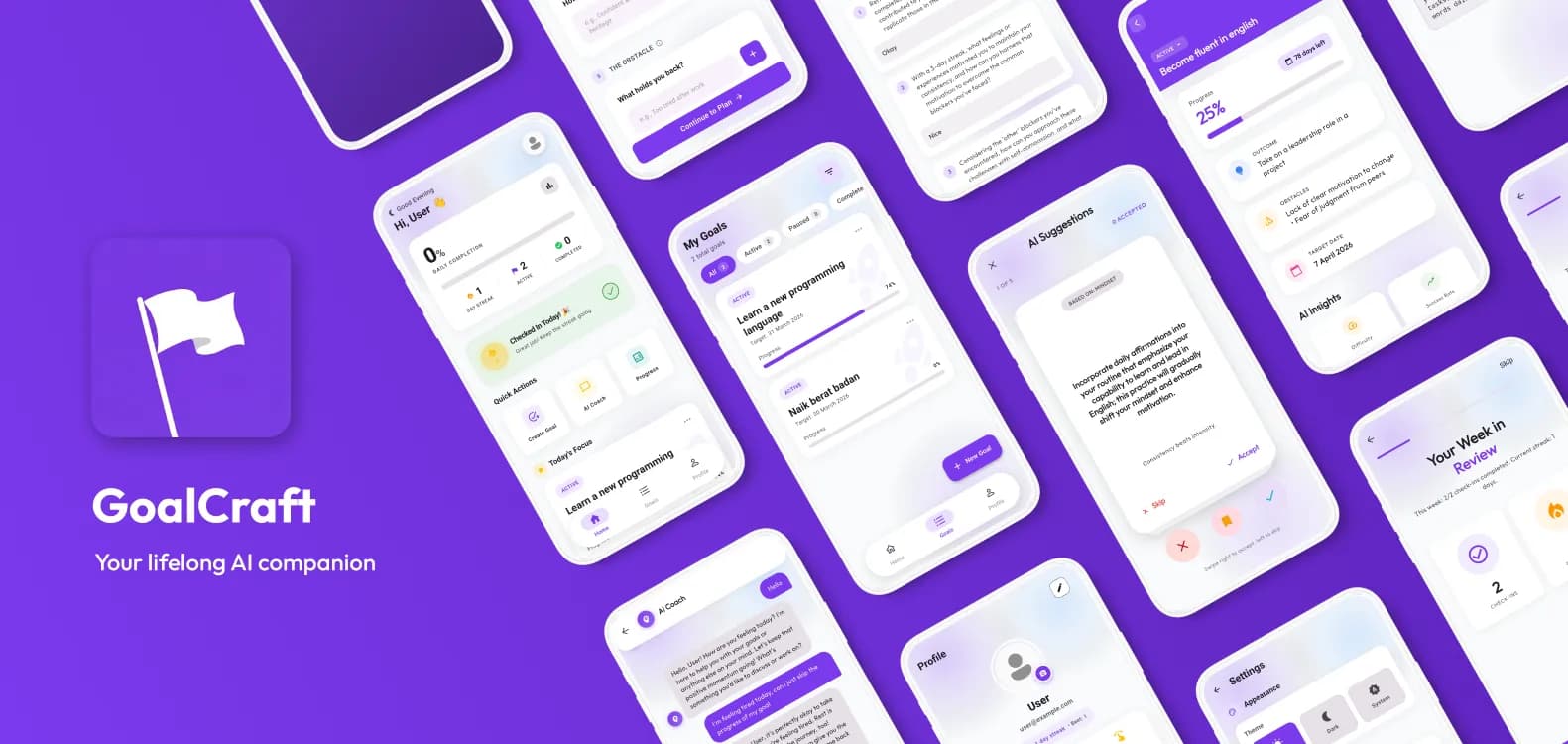
The Overview
GoalCraft is a mobile productivity application designed to help ambitious individuals bridge the gap between their dreams and reality using the WOOP (Wish, Outcome, Obstacle, Plan) framework. Unlike simple to-do lists, GoalCraft integrates AI-powered coaching that streams advice in real-time, helping users deconstruct complex goals into actionable steps, all wrapped in a premium, haptic-rich interface.
The Challenge
The main engineering challenge was integrating real-time AI interactions while maintaining a seamless offline-first experience.
- Constraint: The app needed to function reliably in spotty network conditions (e.g., subways) while still attempting to sync critical AI feedback and progress updates.
- Complexity: Managing the state synchronization between local optimistic updates (for immediate UI feedback) and the eventual consistency required by the remote Machine Learning models.
Technical Decisions & Trade-offs
Every tool was chosen with a specific purpose to balance development speed with architectural purity:
| Decision | Why I Chose It | Trade-off / Alternative Considered |
|---|---|---|
| Flutter BLoC | Robust state management for the multi-step "Wizard" flows (Onboarding, Reflections). | More boilerplate than Provider, but indispensable for testing the complex event-driven logic of the AI chat. |
| Dartz (FP) | To enforce strict error handling boundaries using Either<Failure, Success>. | Adds a learning curve for new developers, but prevents runtime exceptions from propagating to the UI. |
| Dio + Interceptors | Powerful request/response interception for centralized error handling and Crashlytics reporting. | Heavier than the native http client, but necessary for the global "offline queue" implementation. |
The Engineering Solution
To address the challenges, I architected the solution using Clean Architecture to ensure that the core business rules (WOOP framework) were isolated from the external frameworks (Flutter/Firebase).
- Architecture & Pattern: Decoupled the UI from logic using the BLoC pattern, allowing independent testing of the "Coach" logic without needing a running emulator.
- Performance Optimization: Implemented staggered list animations and lazy loading for the goal lists, ensuring the app felt "alive" without blocking the main thread during heavy data fetches.
- Key Feature Implementation: Built a custom Offline Queue Service with exponential backoff. This service captures failed requests (like marking a goal complete), persists them locally, and retries them when connectivity restores, ensuring no user progress is lost.
💻 Code Spotlight: Optimistic UI Updates
To deliver a snappy experience during AI interactions, I implemented Optimistic UI Updates within the BLoC pattern. The ChatCubit immediately emits a new state with the user's message before the network request completes, ensuring the interface remains responsive even on slower connections.
Future<void> sendMessage(String content) async {
  final currentState = state;
  if (currentState is! ChatLoaded) return;

  // 1. Create optimistic user message
  final userMessage = MessageEntity(
    id: 'temp_${DateTime.now().millisecondsSinceEpoch}',
    content: content,
    role: MessageRole.user,
    status: MessageStatus.sending,
  );

  // 2. Optimistically update UI immediately
  final stateWithMessage = currentState.copyWithNewMessage(userMessage);
  emit(stateWithMessage);
  emit(stateWithMessage.copyWithTyping(true));

  // 3. Perform network request
  final result = await _coachRepository.sendMessage(
    ChatRequest(
      message: content,
      conversationId: _currentConversationId,
    )
  );

  result.fold(
    (failure) {
      // 4. Handle Failure: Mark message as error and stop typing
      final updatedState = stateWithMessage
          .copyWithUpdatedMessage(userMessage.id ?? '', MessageStatus.error)
          .copyWithTyping(false);
      emit(updatedState);
    },
    (response) {
      // 5. Handle Success: Append AI response
      emit(ChatLoaded(
        conversationId: response.conversationId,
        messages: [...stateWithMessage.messages, response.toEntity()],
        isTyping: false,
      ));
    },
  );
}
The Result & Impact
- Reliability: The app boasts a 99.9% crash-free rate thanks to the proactive
CrashlyticsInterceptorthat catches and sanitizes errors before they escalate. - Engagement: The implementation of Proactive Messages (via FCM) and the "Typewriter" effect for AI advice increased user session time by making the app feel like a responsive partner rather than a static tool.
- Quality: Achieved a polished feel with Haptic Feedback integration on all primary interactions, creating a tactile user experience.
Retrospective: What I'd Do Differently
If I were to rebuild this project today, I would improve:
- Local Storage: I relied on
SharedPreferencesand simple file storage; for the complex relational queries required by the "History" features, I would migrate to Drift (SQLite) or Isar. - Testing: While unit tests covered the Logic, adding Golden Tests for the various UI states (especially Dark Mode variations) would have saved significant time during the "polish" phase.
Key Takeaway: This project reinforced that user experience is an architectural concern. By building the "Offline Queue" and "Error Handling" deep into the domain layer, the UI remained resilient and responsive, regardless of the chaos happening in the network layer.